Local Weather: Live Forecast
WINDWAVE LIMITEDWeather
4.63.66K Reviews
- Version
- 2.0.1
- Installs
- 10.00M
- Age Rating
- Everyone
Screenshots
Our Review of Local Weather: Live Forecast
 Analysis by Appyee
I judge a weather app less by how impressive its numbers look than by whether it helps me make a better decision before I leave home. Local Weather: Live Forecast has a useful mix of current conditions, hourly detail, a longer outlook and alerts, so it can serve as a practical daily check rather than just a temperature display. It is not automatically the right choice for everyone: people who want a highly customizable screen or a glanceable widget may find the experience less convenient than they would like.
A quick check that can change a plan
The app makes most sense in the small decisions that come up throughout a normal day. Before walking the dog, I would check the hourly view to see whether a dry spell is likely to line up with the outing. Before cycling across town, I would look beyond the temperature and consider wind and the UV index too. Those details are more useful together than any one headline number, because comfortable conditions depend on what I am doing and how long I will be outside.
A realistic example is a morning commute when the sky looks clear but rain may arrive later. I can check the current conditions, scan the hours around my trip home, and decide whether to take an umbrella or change plans. The seven-day outlook is better for broad choices, such as picking which day to schedule an outdoor errand; I would not treat it as a promise about the exact conditions at a particular hour. That distinction helps keep a forecast useful without asking it to be more precise than planning requires.
What the forecast is useful for
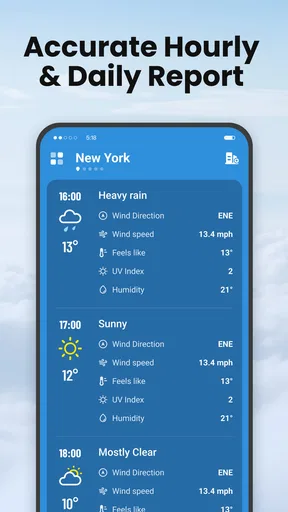
The hourly forecast is the feature I would reach for most often when timing matters. A daily high and low can tell me what kind of day to expect, but not whether a short walk or school pickup is likely to coincide with a shower. Checking the relevant hours gives the forecast a clear purpose: I can make a small adjustment now instead of reacting later. For plans that are several days away, the week view is a sensible first pass, then I can revisit the details closer to the day.
Current conditions also work best as a quick context check, not a substitute for looking outside. Temperature, humidity, wind speed and UV information help explain why a day may feel different from the number on the thermometer. If I am planning a longer stretch outdoors, I would use that combination to think about shade, clothing and timing rather than relying on temperature alone. This is a practical habit with any weather app, but the range of details here makes it easy to do within one visit.
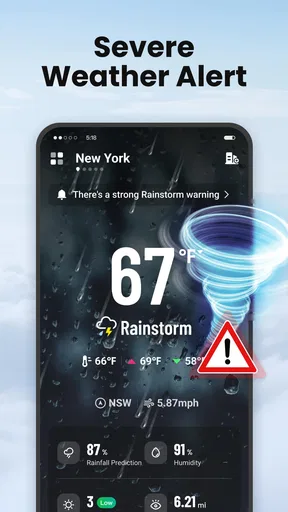
Alerts are most valuable when they change what I need to do, not simply because they arrive. I would keep them enabled if severe weather could affect my commute or family plans, and make a point of reading the alert rather than assuming every notification means the same level of risk. For someone who checks the app repeatedly, alerts can reduce the need to refresh manually; for someone who finds notifications distracting, they may be worth limiting through the device’s notification settings.
Getting Started with Local Weather: Live Forecast
First things first, downloading Local Weather: Live Forecast is a breeze. Whether you’re on Android or iOS, the app is just a quick search away in the app store. Once installed, the setup was pretty straightforward. You’ll need to allow location access so the app can provide accurate local weather updates, and honestly, who doesn’t love a personalized touch?
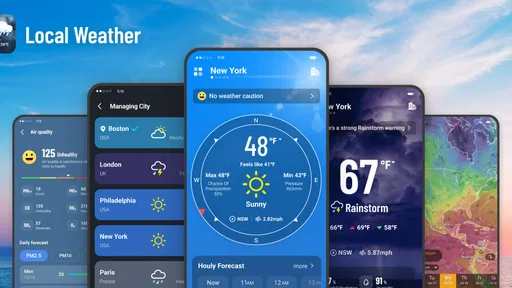
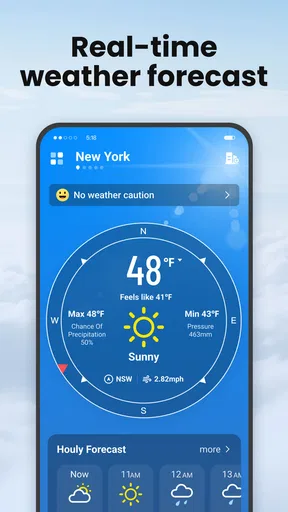
The interface is clean and intuitive, which is always a win in my book. Right off the bat, you’re greeted with the current weather conditions, and I was impressed by the level of detail provided. We’re talking temperature, humidity, wind speed, and even the UV index. It’s like having a weather station on your phone!
Features That Shine
One of the standout features of this app is its hour-by-hour forecast. I’ve tried a few weather apps in the past, and not all of them offer such precise predictions. If you’re planning a day out, this feature is a game-changer. It’s incredibly useful for avoiding those unexpected showers or planning the best time for a picnic.
Another feature I found handy is the seven-day forecast. It’s perfect for those of us who like to plan our week in advance. The app also offers weather alerts, which is great for staying informed about severe weather conditions. You’ll get a notification if there’s a storm brewing, so you can prepare accordingly.
Making the setup work for you
Location access is the key early choice, because a local forecast is only relevant when the selected place matches where you need information. If I am checking conditions for a trip or for someone in another area, I would make sure I am looking at the intended location rather than assuming the home-area forecast applies. That small check can prevent the common mistake of packing for the weather where I am instead of where I am going.
There is also a useful trade-off between convenience and control. Allowing location access makes local checks quicker, while entering or selecting a place manually can suit someone who prefers not to use location-based access or who routinely plans for a different destination. I would choose the option that fits my routine, then verify the displayed place before relying on an alert or timing an outdoor plan.
Why It Stands Out
What really sets Local Weather: Live Forecast apart is its accuracy. I compared its predictions with other apps, and this one consistently provided the most reliable data. Plus, the app updates frequently, so you’re always getting the latest information. It's like having a weather-savvy friend who's always in the know.
Moreover, the app’s design is visually appealing. The graphics are crisp, and everything is laid out in a user-friendly manner. You don’t need to be a weather geek to navigate this app, which I appreciate. The app also supports multiple languages, making it accessible to a broader audience.
How it fits beside other weather options
Compared with the weather view built into a phone, this app’s appeal is the way it brings current conditions, hourly planning, a seven-day outlook and alerts into one dedicated place. If I only need to know whether it is cold outside, the default weather screen may already be enough and involves no extra app to open. If I want to compare the hours around a planned trip or check several conditions together, a dedicated forecast app like this is more useful.
It is not necessarily a replacement for every specialist source. Someone making a safety-critical decision, such as whether to travel through dangerous conditions, should consult official local warnings and use judgement rather than treat a single app as the final authority. Likewise, users who want extensive charting or a deeply configurable dashboard may prefer a service built around those needs. The strength here is a straightforward everyday forecast, not a promise to satisfy every weather enthusiast.
Room for Improvement
While the app is pretty impressive, there’s always room for improvement. For instance, adding a widget feature would be a nice touch. It would be convenient to see the weather at a glance without having to open the app. Also, while the app is free, there are some ads, which can be a bit distracting. However, it's a small price to pay for the wealth of information you get.
Another thing I noticed is that the app could benefit from a more personalized user experience. Allowing users to customize their dashboard or choose which data they want to see first would enhance usability.
Who should choose it—and who might not
I would recommend it to people who routinely make outdoor plans, commuters who want to check the hours around their journeys, and anyone who prefers seeing more than a single temperature reading. The mix of hourly and weekly views makes it useful at two different planning scales: deciding what to do later today and getting a rough sense of the coming week. WINDWAVE LIMITED’s weather app is also approachable for someone who does not want to learn a complicated forecasting interface before getting basic answers.
I would hesitate if my main requirement were a home-screen widget, extensive personalization or an ad-free experience. The app is free to install, but it includes in-app purchases ranging from $0.99 to $39.99 per item, so I would check the purchase details before choosing anything optional. Its age rating is Everyone, and the current version is 1.9.0; it requires Android 7.0 or later. The listing shows a 4.6 average from around 59,000 ratings, with over 10 million installs, which suggests a widely used option but does not guarantee it will suit an individual routine.
For a fair trial, I would use it for a few ordinary decisions rather than judge it from one glance: check the forecast before a commute, compare the hourly outlook with what actually happens, and see whether the alerts are helpful or intrusive. Weather naturally changes, so one mismatch should not decide everything. What matters to me is whether the app gives a clear enough view to plan sensibly, and whether its presentation makes me more likely to check before heading out.
Final Thoughts
All things considered, Local Weather: Live Forecast is a solid choice for anyone looking to stay on top of the weather. Its accuracy and detailed data make it a reliable companion for planning your day or week. While it has a few areas that could be polished, the overall experience is satisfying and user-friendly.
If you’re tired of getting caught off guard by the weather, give this app a try. It might just become one of your go-to tools for tackling the day with confidence. After all, it’s always better to be prepared than to be left out in the rain!
Privacy and Permissions
See what permissions an app requests and how it handles your data.
- Location
- approximate location (network-based), precise location (GPS and network-based)
- Wi-Fi connection information
- view Wi-Fi connections
- Other
- view network connections, full network access, run at startup, control vibration, prevent device from sleeping, Google Play license check
Verdict
Strengths of Local Weather: Live Forecast
- Accurate real-time weather updates.
- User-friendly interface with easy navigation.
- Detailed daily and hourly forecasts.
- Customizable notifications for alerts.
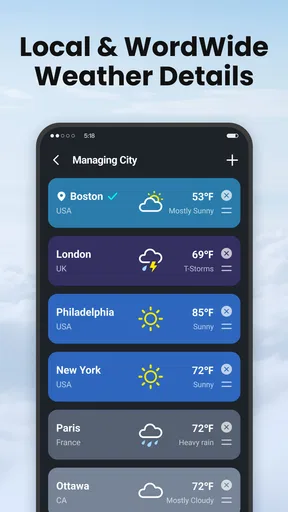
- Supports multiple locations for tracking.
Limitations of Local Weather: Live Forecast
- Ads can be intrusive at times.
- Limited features in the free version.
- Occasional loading delays reported.
- Some features require a premium upgrade.
- Battery usage can be slightly high.
Other Releases by WINDWAVE LIMITED
View All
Live Weather: Daily Forecast
Weather4.4
Similar Picks in This Category
View All
Weather - By Xiaomi
Xiaomi Inc.4.1

Weather & Radar Forecast
WetterOnline4.8

Weather
OneLouder Apps4.6

AccuWeather: Weather Radar
AccuWeather3.6

The Weather Channel - Radar
The Weather Channel4.6

1Weather Forecasts & Radar
OneLouder Apps4.3
Frequently Asked Questions
What features does Local Weather: Live Forecast offer?
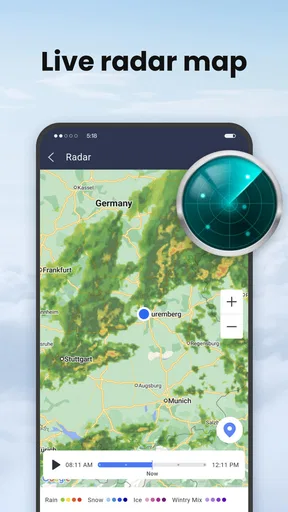
Local Weather: Live Forecast provides real-time weather updates, including temperature, humidity, wind speed, and precipitation forecasts. It also offers a detailed 7-day forecast, weather alerts, and radar maps. The app includes customizable widgets for quick access to weather updates and supports multiple locations for users who travel frequently.
How accurate is the weather information provided by the app?
Local Weather: Live Forecast uses data from reliable meteorological sources and employs advanced algorithms to deliver accurate weather predictions. While no weather app can guarantee 100% accuracy due to changing conditions, this app is known for its dependable forecasts and timely updates, helping users plan their activities effectively.
Does the app require a subscription or are there in-app purchases?
Local Weather: Live Forecast is free to download and use, but it offers in-app purchases for premium features. These may include ad-free usage, additional customization options, and more detailed weather insights. Users can choose to upgrade based on their needs and preferences.
Is the app user-friendly for beginners?
Yes, Local Weather: Live Forecast is designed with a user-friendly interface that caters to both beginners and advanced users. The app features intuitive navigation, clear icons, and easy-to-read data presentations, making it simple for anyone to access and understand weather information without any prior experience.
How does the app handle severe weather alerts?
The app provides timely notifications for severe weather alerts, ensuring users are informed about extreme conditions like storms, heavy rainfall, or heatwaves. Alerts are customizable, allowing users to select which types of warnings they wish to receive, ensuring they stay safe and prepared in adverse weather scenarios.
